Skip to content
Private betamacOS · Windows · Linux

Speak clearly on camera. Fewer ums, every take.

Record a short take. About a minute later, Lugas marks every filler with a timestamp, checks your pace and clarity, and gives you one thing to fix next time. In English, Indonesian, or both in the same sentence.

One email when Lugas launches. Nothing else.

  • Recordings stay on your computer
  • Bring your own AI key
  • One-time purchase
Report
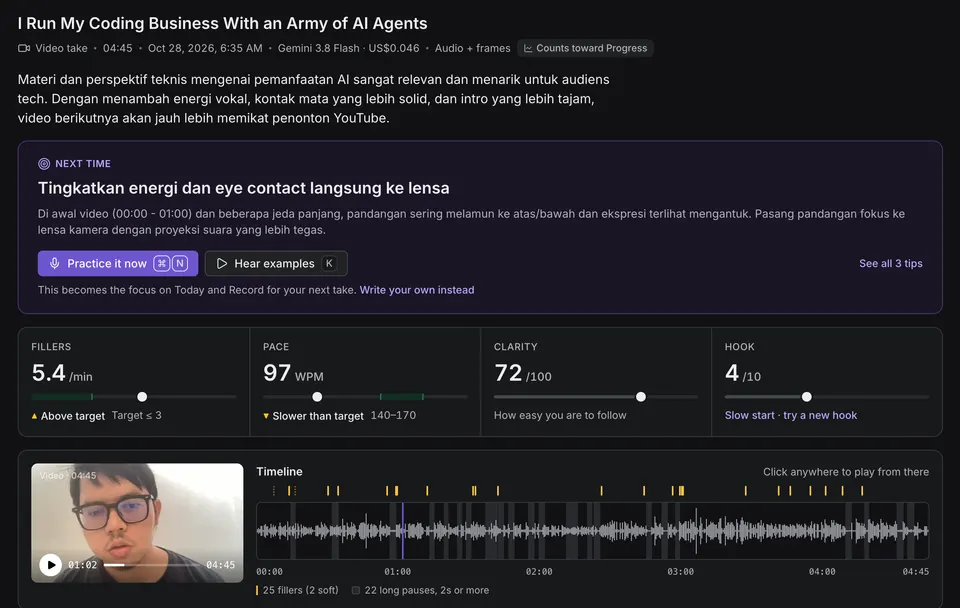
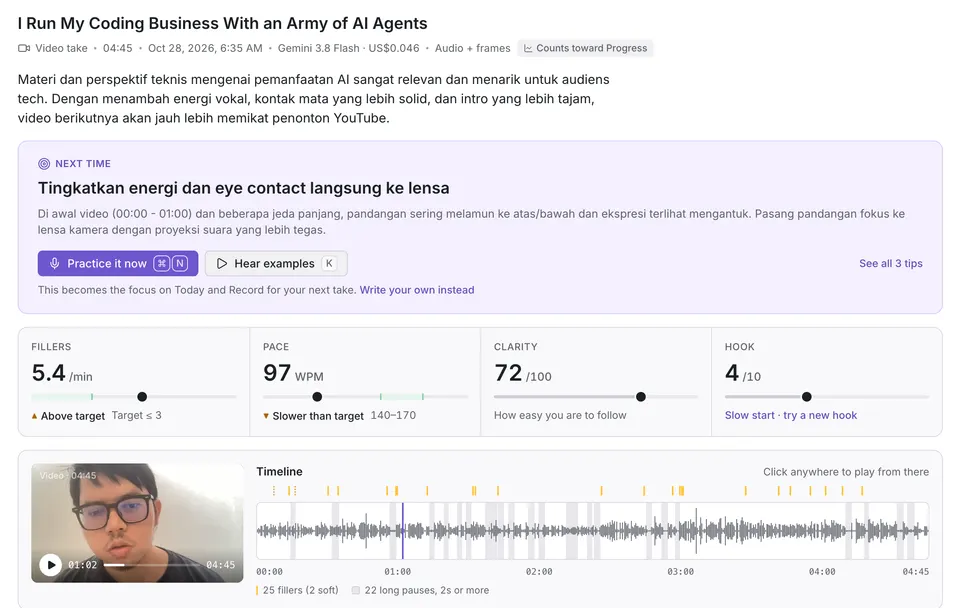
The report for a 4 minute 45 second video take: the summary, a Next time card with one focus, scores for fillers (5.4 per minute), pace (97 words per minute), clarity (72 out of 100) and hook (4 out of 10), and the video player beside a timeline of 25 fillers and 22 long pauses.The report for a 4 minute 45 second video take: the summary, a Next time card with one focus, scores for fillers (5.4 per minute), pace (97 words per minute), clarity (72 out of 100) and hook (4 out of 10), and the video player beside a timeline of 25 fillers and 22 long pauses.
My own take, 04:45, mostly in Indonesian: 25 fillers and 22 long pauses.Every screen

Two languages, one sentence

So, um, today I want to talk about, jadi, why most developers, you know, struggle to explain…

00:073 fillers in 7 seconds. Lugas catches them in English and Indonesian, even when you switch mid-sentence.

What you get

Numbers you can act on, and one thing to fix next.

Fillers

25 fillers in one take, each with a timestamp.

  • Every filler is marked in the transcript and on the timeline.
  • Click a mark to hear that moment. J and K step through them.
  • Works in English and Indonesian, even when you switch mid-sentence.
  • um
  • you know
  • basically
  • like
  • eee
  • jadi
  • gitu ya
  • apa namanya

Transcript

Fillers are highlighted where they happened. Soft ones get a dotted line; restarts are struck through.
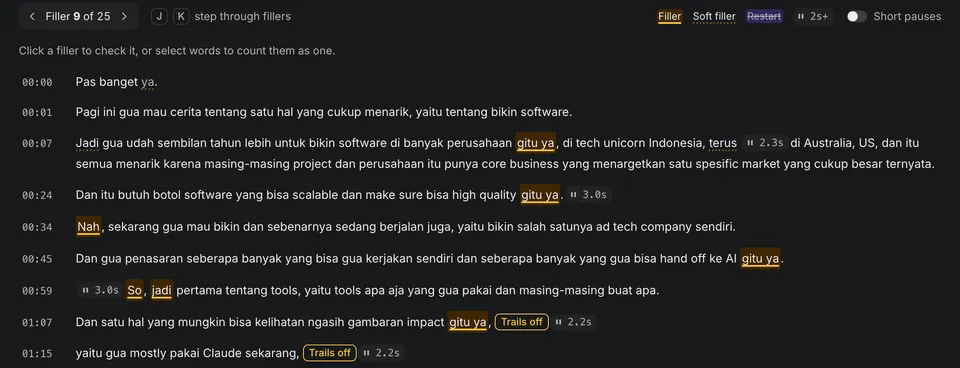
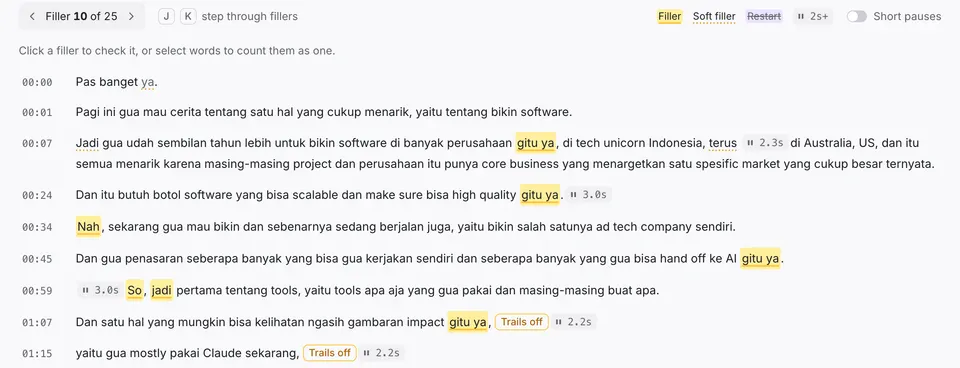
The transcript of the take, in Indonesian with English mixed in, with timestamps down the left. Fillers such as gitu ya, nah, so and jadi are highlighted in amber; soft fillers have a dotted underline; a restart is struck through; pauses over 2 seconds show as chips.The transcript of the take, in Indonesian with English mixed in, with timestamps down the left. Fillers such as gitu ya, nah, so and jadi are highlighted in amber; soft fillers have a dotted underline; a restart is struck through; pauses over 2 seconds show as chips.
JKPrevious / next fillerClick a timestamp to play from there

Score strip: fillers 5.4 per minute, above the target of 3 or fewer; pace 97 words per minute, slower than the 140 to 170 target; clarity 72 out of 100; hook 4 out of 10, a slow start.Score strip: fillers 5.4 per minute, above the target of 3 or fewer; pace 97 words per minute, slower than the 140 to 170 target; clarity 72 out of 100; hook 4 out of 10, a slow start.
The Next time card, in Indonesian: lift your energy and keep eye contact straight into the lens, with evidence from the first minute of the take, and a Practice it now button.The Next time card, in Indonesian: lift your energy and keep eye contact straight into the lens, with evidence from the first minute of the take, and a Practice it now button.
The tip is in Indonesian because the take was. It says: lift your vocal energy and look straight into the lens; in the first minute the eyes wandered and the energy dipped.
Pace and feedback

97 words a minute is slow. Lugas says so, then says what to do.

  • Pace is checked against a 140–170 WPM target.
  • See where the long pauses were and how your hook landed.
  • Notes on the structure you followed.
  • Video takes add eye contact, energy, framing and lighting.
  • One habit goes in Next time and stays there until you record again.
Progress

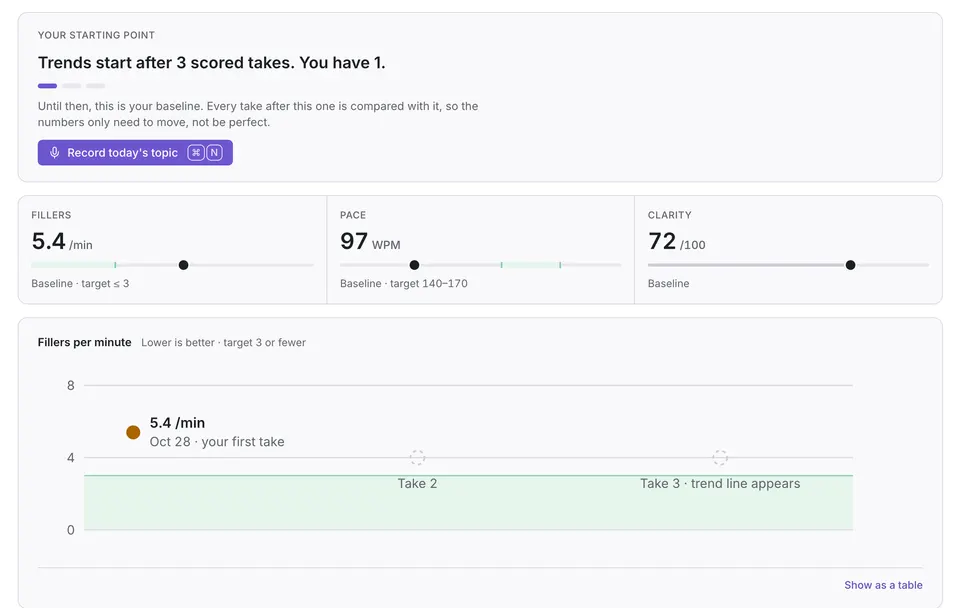
Take 1 is your baseline. From take 3, you get a trend.

  • Fillers per minute, pace and clarity, charted against your targets.
  • A streak of the days you practiced.
  • No badges. No points.
  1. Take 1Baseline set
  2. Take 2First comparison
  3. Take 3Trend line appears
The Progress screen after the first scored take: Trends start after 3 scored takes, you have 1; the baseline of 5.4 fillers per minute, 97 words per minute and clarity 72; and a fillers-per-minute chart with the first point plotted and take 3 marked where the trend line appears.

Built for the keyboard

  • SpaceRecord / stop
  • ⌘↵Analyze take
  • JKStep through fillers
  • ⌘OImport a recording
  • ⌘KCommand palette

How it works

Set up once. Then it is record, read, repeat.

  1. 01About 3 minutes

    Connect OpenRouter

    Sign in or paste an API key, then add credit.

  2. 022–6 minutes

    Record a take

    Speak on today's prompt or your own topic, with your mic or webcam.

  3. 03About a minute

    Read the report

    Fillers, pace, pauses, hook and clarity, plus one focus for your next take.

Pricing

No server. No subscription. About 3 cents a take.

You pay OpenRouter directly, at cost, with no markup. Lugas itself is a one-time purchase, and it shows the estimate before every analysis.

3-minute audio take, default model (Gemini 3.8 Flash)
~US$0.03
A real 4:45 video take
US$0.046
One license, any mix of macOS, Windows and Linux
3 computers

What leaves this computer

The same panel you'll find in Settings.

The take's audio or its video goes to OpenRouter, then to Google. Your topic title, name and what you're practicing for go along to guide the coaching; your other recordings, history and notes never leave this computer.

Sent, only for the take you analyze

  • The take's audio or video
  • Topic title, your name and practice goal, to guide the coaching

Stays here

  • Every other recording and report
  • Your API key, in the OS keychain
Full detail in the privacy policy.

Lugas is in private beta. I use it every morning.

It launches as a one-time purchase on Gumroad. Leave your email and you'll get one message, on launch day.

One email when Lugas launches. Nothing else.

Anas, @oianas_ on X

FAQ

Questions, answered plainly.

Something else? Email [email protected].

Is my key safe?

Your OpenRouter key lives in the system’s secure storage: macOS Keychain, Windows DPAPI or the Linux keyring. Lugas only uses it to call OpenRouter from your computer. It never goes into logs, backups or diagnostics, and it is never sent to me. You can have Lugas forget it on quit.

What does it cost to run?

You pay OpenRouter per report, with no subscription and no markup. On the default model, Gemini 3.8 Flash, a 3-minute audio take is about US$0.03. Video costs more: the 4:45 example was US$0.046. You see the estimate before you analyze.

Which models work?

Any OpenRouter model that accepts audio. Settings lists them with estimated costs, and Gemini 3.8 Flash is the recommended one. Video models get the full recording; audio-only models get the audio plus a few still frames.

Does it work offline?

Recording, playback, past reports and Progress all work offline. Analysis needs a connection, so record now and get the report later.

How many devices can I use?

Up to 3 computers per license, in any mix of macOS, Windows and Linux. Replaced a computer and ran out of slots? Email support for a reset.

What about refunds?

Refunds go through Gumroad, which will show the refund window on the product page at launch. There is no free trial, so if Lugas doesn’t work for you, ask for a refund.